Tools used
CSV import
A CSV import flow, designed in Figma
A step-by-step interface for importing CSV files, with data preview, column mapping, and validation before upload. Designed in Figma.
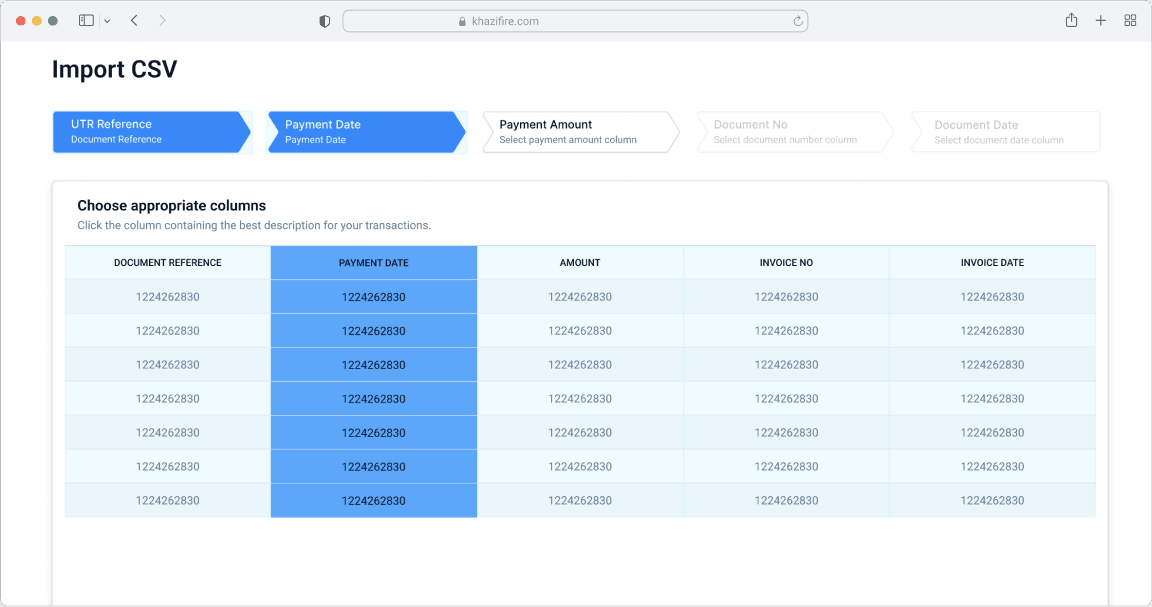
A CSV import flow, designed in Figma
Importing a large CSV file is tedious, and a plain upload form gives no help when the data is wrong. We designed the interface for a stepper app that walks users through the import and checks the data before it goes to cloud storage.
How it works
- Upload. Drag and drop the CSV file, or use the upload button.
- Preview. A table shows a sample of the data so the user can check its format and structure.
- Map and validate. Each step covers one data element. The user picks the matching column in the CSV, and the app highlights rows by whether the value meets the set criteria, so errors are easy to find and correct.
- Summary and upload. A final screen lists every mapped element and any remaining issues, then the user starts the upload.
It is aimed at people who import CSV files often and need to know the data is valid before it is uploaded.
Have a Project in Mind?
Free Consultation, No Obligation
Tell us what you're building and we'll follow up with real next steps instead of a sales script.